
This report from ArsTechnica declares that social networking sites are a huge target for malware. They also mention that URL shortening services mask the actual URL. Smartphones are attracting malware. Thanks to Jim Hamm for keeping us informed.
Do Taxes Online? Consider This . . .
It's Tax Time and here's a sobering message from Jim Hamm first thing this morning. He writes, "According to this article, Intuit was not affected by the recent hack into Epsilon's e-mail data file, but warns its customers to be careful anyway. We use Intuit's Turbo Tax online system to do our tax return each year. The possibility of a breach of a company's security system is one downside, and risk, of storing personal data online. But, with the popularity of online shopping, banking, etc., it's almost impossible not to do so."
Listen to the Music
Ah, time for a break from the really serious stuff. How about some music? Where do you keep yours? Jim Hamm suggests we store music on an external hard drive. He says he's not a big fan of cloud storage or of streaming music from the cloud. There's a lot of useful info and links in this article about Amazon's Cloud Drive and Cloud Player.
Things About Trojans You Need to Know
Ever watchful, here's from Jim Hamm. With the title, "I Smell a RAT" we know that there's something here to read! What are trojans and how do you get them? How do you protect your Mac? Jim comments, "It's oft been said the best protection from the malware lies between the chair and the computer!" While you're at it, you might want to sign up to get Small Dog Electronics' Tech Tails.
Warning About Email Swindles
Alert for security breaches, the latest breaking news about Epsilon grabs our attention. We heard from Jim Hamm who has been notified by Chase Bank.
Jim sends us this article from ComputerWorld which lists 32 companies who are involved. The writer advises, “Keep your security software updated. If you feel like you really must open an email from one of these companies, then mouse over the link to see if the domain name matches the company. Check for HTTPS. Don't give out sensitive personal information unless you are 100% sure you are dealing directly with the company as these emails can open the way to identity theft."
Function Keys Can Help
Making good use of those function keys or a combination of several keys? Both John Carter and Jim Hamm passed along some tips today. Want to know a lot more? Maybe ask them to do a PMUG presentation?
Jim started off with this: "Here's a Mac tip I just discovered. To turn the display screen off (and not put the Mac to sleep): Shift + control + keyboard eject button. Moving the cursor brings the screen back on.
"When might a person use this, you ask? Say, for example, your Mac is in your bedroom and you want to stream and copy something into your Mac in the middle of the night and don't want the bright screen on. Or, say you're using a laptop, not plugged in to electricity, and want to conserve the battery. Turn the screen off.
"Here's another tip I occasionally find useful: to minimize all open windows quickly, press the shift button. For example, I may be typing an email and want to look at something on the desktop. Tap shift, take a look, tap shift again to return to the email. There are other ways to do this, as well."
Trying to replicate this didn't work for me. A query to Jim brought a quick reply, "At this point, I don't know or recall how I did this. I checked all my settings and don't see anything about this setting. It works just on the right shift key, but not the left. The left 'shift' key does the normal shift function. If I come across the setting I'll let you know.
"Here's something to look at. One might be able to click the desktop, then +, then add shift key to see if that would work. Or look at this one."
John shed some light on the function keys with his input. "The action of the function keys, whether you have to press the fn key plus the function key or just the function key to get the desired action is determined by a preference setting. With a standard Mac keyboard, in System Preferences > Keyboard, you should see a box like this:
"So, if you press the F12 key and this increases the sound volume, that box is not checked. With the box checked, pressing the F12 key brings up the Dashboard.
"The is different for different keyboards used. I use the Logitech diNovo Keyboard Mac Edition on my iMac. That box is not even available for that keyboard.
"So what’s the ideal setting? If you look at the function keys on your keyboard, the symbols for the special features are large and the letters for the standard features are small. To some, this would indicate that the default action when pressing a function key would be for the special feature, not the standard feature, so the box would not be checked. The choice is really yours."
And John concludes with this additional information about assigning keyboard shortcuts, "Assigning any of the modifier keys (Shift, Control, Option, Command) to perform a special function with a single press is contrary to the 'normal' and 'customary' method of using those modifier keys (aka meta key). The developer’s intended usage is that one or more modifier key is always pressed with one or more other key which is not a modifier key (a-z, A-Z, 0-9, space, symbol, function key). To see all the keyboard shortcut assignments, open System Preferences > Keyboard > Keyboard Shortcuts. Unlike the modifier keys, the function keys can be reassigned to suit your own needs, but such reassignment is best done for use with a particular application."
It's the People Who Make It Special
Only 30 seconds long, this iPad commercial touches both mind and heart. And you might agree that it's the same with Mac and the PMUG people. Thanks to Jim Hamm for sending this link.
Mac Email Tip
Want to make your emails look neater, more professional for your recipient? John Carter explains a quick, nifty procedure which works for Snow Leopard, not Tiger or Leopard:
"If you find a website that you want to share with someone, the best way to send the URL is to embed the URL as a link in some part of the body of the message. For instance, let’s say you just looked at the YouTube video Two Dogs Dining. Great for a laugh! What follows are instructions for embedding a link in an e-mail message using Apple Mail to create a really clean looking message.
1. Copy the link of the website from the address bar in the browser.
2. Open a new message in Apple Mail (the postage stamp in the Dock).
3. In your own words in the body of the new message, tell your friend what it is you want them to look at. Something like this: “Hi. I just saw a great YouTube video called Two Dogs Dining. What a great laugh I had. Click here to see it for yourself.”
4. Now, double click the word “here” to highlight it.
5. Press Command-K on your keyboard. A window will pop up.
6. Paste (Command-V) the link you copied from the browser address bar:
7. In this case, the link wasn’t all that long, but it could have wrapped around that window three times.
8. Now click OK. The word “here” will now have the link embedded in it and it will look like this:
Click here to see it for yourself.
And if you click on the word “here” in the line above, it will take you to the YouTube video Two Dogs Dining.
If you attempt to embed a link in a plain text message, you will get a prompt asking if you want to convert the message to RTF or leave it as plain text. You cannot embed a link in a plain text message."
A Reminder to Be Careful
A warning of a trojan comes from Jim Hamm. The Mac blog he subscribes to sent this, ""Today the Black Hat Trojan infected a Mac OS X server at a company that I work with in Washington, D.C. The company has about 65 Macs at this location. The Trojan came in via an unknown attachment to an email message and then infected 15 Macs that had been asleep during the night. When employees arrived for were five were tricked by the Trojan into keying in their Admin password at which point the entire HD was wiped clean including OS and the Trojan itself."
Jim adds, "Along the same vein are comments on a backdoor trojan from this website." And Jim concludes, "No great cause for alarm, just something to be aware of. From further reading on the blog, one should be careful if all of a sudden you're asked to enter your admin password -- especially when, at that point in time, it isn't normal for you to do so."
Bargain Magazine Subscription
Jim Hamm notifies us of a bargain subscription deal for MacLife. It's only $8.69 when you enter the discount code MAC. Jim's extended his subscription for a year, remarking, "MacLife is a good magazine, in my opinion."
Six Ways to Clean Your Mac
No, not soap and water! Jim Hamm suggests we read the helpful article from MacWorld on how to get rid of old files and make more room on your hard drive.
Solved: Damaged SD Card Problem
"You might some day discover that the SD card in your digital camera appears to be damaged," John Carter gets our attention! "You put it your computer and the computer says that the card has to be initialized. But you know there are hundreds of photos on it that haven’t yet been transferred off the SD card. Not to worry. There’s a free solution to recovering photos from what appears to be a damaged SD card. A recent article in Digital Photography School describes the application and how to use it."
All of our PMUG photography buffs thank you, John.
How Does the Internet Work?
Wondering how the Internet works? Does it keep you up at night, thinking about it? Jim Hamm calls this an "informative overview," and now John Carter adds two other sites to check out -- an image showing the intricacies of the Internet here, and an explanation about the coming iPv6.
Gmail Solution is Posted
Having a problem with Gmail? Never fear, John Carter to the rescue. John has been accepted as a writer for the popular WikiHow, and he introduces his topic, "I posted an article here that goes into some detail about working with a Gmail IMAP account in Mail. It discusses a major issue regarding the ALL MAIL mailbox wherein you might be thinking that, try as hard as you can, you can’t delete a message from that mailbox, or that after deleting a message from another mailbox it still shows up in All Mail. Don’t worry about it. There is a solution."
Mac Cheat Sheet
Helping us get better organized, John Carter writes, "Have you ever wanted all the right information about your Mac in one place? Apple put a very useful page online in its support section. It’s a form that appears to be the Mac owner’s dream come true to keep the kind of information at your fingertips that you need -- especially when calling Apple support."
John goes on to suggest, "If you print directly from the web page, the information on the printed page comes out jammed to the left edge of the paper and some text is lost. In order to get a decent print, I had to copy the text and the form off the web page and paste it into TextEdit, then print from TextEdit." (Elaine adds, "I pasted to Pages and found it came out printed in larger size type, 2 pages, two-sided.")
More on the iPad 2
A real geek who is a first time tablet user passes along his experience with apps on the iPad 2. Photos and descriptions pique our interest in this piece sent to us from Jim Hamm.
Time to Invest?
With a title like, "The most misunderstood stock on Wall Street: Apple" this investors' article recommended to us from Bill Williamson does deserve mention. Four reasons are analyzed and shown to be wrong. Keep informed; this will bring a smile to your face.
Solid State Drive in Your Future?
"I think it's the technology of the future," comments Jim Hamm about SSD, as he sends us this article from Small Dog Tech Tails. Scroll down to "Just a TRIM." It explains why a Solid State Drive (SSD) needs a TRIM (or a similar function) to prevent the degradation, over time, of the write function. (TRIM, while capitalized, is not an acronym for anything; its purpose is to trim old data from the SSD.)
I asked Jim about replacing an existing drive in a Mac with a SSD. He says it's not commonplace, but several new Macs, including the new MacBook Pros with SSD come with Thunderbolt and do support TRIM. He thinks SSDs are available to be used as an exterior drive of Time Machine, and suggests this info from NewEgg.
Decisions Due on Domain Names
The article begins, "Decisions made this week in the meeting rooms of a San Francisco hotel could dramatically change how the world experiences the internet." The writer advances the idea that more top-level domain names means more openings for cybercrime. Not a pretty story, but a topic to follow in the news. Thanks to Jim Hamm for alerting us to this issue.
Not one to procrastinate, we've already heard from John Carter this morning who offers a blow-by-blow rebuttal. His comments have already been posted on globalpublicsquare, (same link as above). After opening that site do Command + F and enter "John" in the Search box to quickly find John Carter's comments.
Here's John's assessment:
"A quote from the article: Right now, there are 21 top-level domains. If ICANN’s new policy is implemented, we will see top-level domains such as .car, .newyorkcity, .hotels and hundreds more. Internet real estate will grow exponentially, creating a more complex experience for every user.
"That part about this being a more complex experience for every user is really unnecessary. It sounds like negative press, and for what purpose? I don’t get it. This would be like saying, “If 5,000 new words were added to the English dictionary, people will have a more difficult time trying to communicate.”
"The addition of the new top-level domains actually simplifies a user’s experience because it aids in identifying the nature of the connection. Just because we are all familiar with and got used to .com and .org doesn’t mean we can’t change and expand our horizons. I think a Republican wrote that article.
"The author goes on to give a more negative meaning to the decision by inferring that only certain people stand to gain financially from the decision (emphasis mine): Those in the business of making money by selling domain names agree, and, unfortunately, they have inserted themselves into ICANN’s policy-making process. For example, the Generic Names Supporting Organization (GNSO) in ICANN's multistakeholder operational model is responsible for introducing and developing the top-level domain policy at hand. The GNSO, however, is largely composed of the same registries and registrars that stand to gain financially by the proposed massive introduction of new top-level domains.
"So what? Is the author complaining that the financial gain isn’t being spread around to everyone? Now I think the author is a Democrat!
"Oops! Wait a minute! Here’s more doom and gloom: This new policy will have great social, economic and security costs. If these new top-level domains are introduced, opportunities for cybercrime and fraud would be increased substantially.
"His question: How would you determine which are fraudulent sites actively misinforming the public?
"The answer simply is: call the supposed owner of the site and get confirmation. What’s so difficult about that? People get scammed every day simply because they don’t bother to verify the source of the so-called official email or URL. The courts have a saying for this: Caveat emptor.
"The author goes on. A massive introduction of top-level domains will overwhelm the existing framework for combating cybercrime, putting millions of internet users at unnecessary risk.
"No more than what is already happening. Just because the 400 new top-level domains introduces more opportunities for scamming doesn’t mean that scamming will increase anymore than it is already. It doesn’t even mean that it will add to the workload of authorities trying to pin down and stop scammers. It only means what you and I and the author want it to mean. If the public gets swayed by this article to join some movement to stop this decision, it would be like asking Webster to stop adding new words to the dictionary.
"More: In addition, consumers will be forced to take extensive measures to protect themselves from fraud and other malicious activities on the internet.
"Extensive measures? What? Name them! Yes, I can make up a lot of scenarios wherein the Internet Public has to protect themselves from nefarious activities. That list won’t increase one iota by adding 400 new top-level domains. The number of directions from where one can get scammed doesn’t change how one avoids being scammed. Where is there any sanity in this author’s comments? Doom and Gloom seems to be his favorite perspective. Who taught this guy to see things objectively? That lesson obviously failed.
"The final blow: ICANN’s original mission – as a domain name regulator with a policy-making process inclusive of all internet users – was well-intentioned, but it has been polluted by constituents primarily concerned with financial gain, leaving the rest of us bearing the cost.
"What cost? Where’s the facts behind this statement? Is it the potential cost of being scammed? I can’t see that there is any out-of-pocket cost to the Internet Public for adding new top-level domains!
"The variety of comments on this article seems to indicate that there are about as many people who agree with the author as disagree with him. Some people are clearly confused by saying they don’t like the idea of a small group of people making decisions like this. To get a Democratic version of this decision would require a majority of the world’s population to know as much about the Internet as that small group of people - good luck on that one!"
And so concludes John's comments. Anyone else want to jump in?
Let's Summarize
Have you used Summarize yet? It works in Pages, Safari, and Word.
You have at your fingertips a nifty little procedure called “summarize.” If you write articles, stories, family history, reviews, or various other genre you might find several benefits. You wrote on and on, now you find the word limit needs to be cut -- in half!
Why not see how the auto-summarize does it? It might give you some ideas, it might even suffice, thus saving you time.
You want to send a brief overview of your piece of writing? Let auto-summarize do it; see if your main points pop out, as you wanted them to.
You have a huge backlog of writing in various folders, and you want to get organized so you can find what you want. Consider using auto-summarize as a preview page in the folder with your notes and various versions of the writing.
This is a handy article.
Try it out. Go to System Preferences > keyboard > services > keyboard shortcuts. Click to put a check mark in front of Summarize. Close, and go to some document to experiment.
(You can double click on the illustrations to enlarge them.)

1. Next, I’m looking at a story I wrote in Pages. Highlight the whole story. Go to the top menu where it says Pages and put cursor on Services. In the list under Text choose Summarize. Up comes a box with a slider so you can choose Summary Size. You can choose from 100% way, way down to one sentence.
After you've done a summary you can save it and put your summary in a Note or even in email. Give it a title and save to your Desktop for now.

2. You can summarize in Safari.
Open a site, highlight what you want, then go to Safari > Services > Summarize. Note you can “stretch” out the box to view that summary
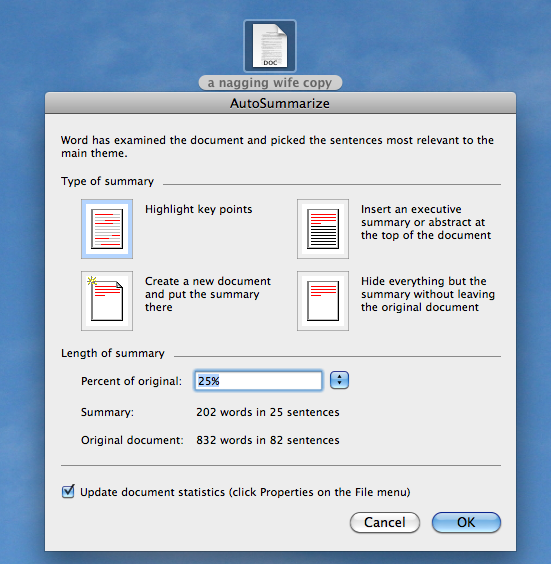
3. In Microsoft Word highlight what you want in your document, then go to Tools > AutoSummarize. This is what comes up. Make your selection and proceed.
Have Mac? Have Fun!
Let us know how you’re using your Mac. Keep informed on what your PMUG friends are doing. Look us up at www. pmugnews.blogspot.com/ and better yet, subscribe to be notified when something new is posted to our newsblog.
(This was the handout at today's March 18, 2011 PMUG meeting. If you missed the meeting we hope to see you next time!)